
WordPress coupon plugin · Affiliate deals plugin · Feedico Sync
Build an automated affiliate coupon website with WordPress
Feedico Sync is the WordPress affiliate store importer and coupon aggregator plugin that pairs with the Feedico cloud: automatic coupon import, merchant listings, and scheduled refreshes - without hand-maintaining spreadsheets or bespoke APIs.
No coding, no manual imports, no spreadsheets
The Feedico Sync plugin is built for publishers - not engineers. Paste your connection from Feedico, choose programs, and let the plugin handle affiliate deals automation on autopilot. No raw REST wiring required to launch a credible coupon site.
0
lines of PHP from you
- ✓Affiliate coupon plugin workflow. Import stores and voucher codes from major networks - your visitors see trustworthy programs, not empty templates.
- ✓Automatic updates via the plugin. New promos land on your WordPress site on a schedule; stale offers can be retired without weekend CSV chores.
- ✓Coupon website builder ergonomics. Use ready-made WordPress blocks and shortcodes so merchandising teams publish grids and store pages fast.
Coupon Publisher Kit v1.0.0
Theme + starter site + Sync — one bundle
The Feedico Coupon Publisher Kit ships the Feedico Publisher block theme, child-theme example, starter pages, and Feedico Sync 2.0.6 with Merchant Studio, rich store pages, JSON-LD SEO, and optional AI enrichment (BYOK). Edit everything in the Site Editor — no custom PHP required.
- ✓Block theme with homepage patterns and store templates
- ✓Merchant Studio — publish SEO store pages from synced data
- ✓Coupon grid: codes first, Expired archive, sticky sidebar
- ✓AI copy assist with your OpenAI / Anthropic / Gemini key
See the bundle live on demo.feedico.io. Full product page: Publisher Kit landing. Need the read-only API explorer instead? Open API demo.
A coupon site engine built for organic traffic
Coupon and deal publishers do not only need automation - they need indexable pages, clean URLs, and layouts search engines understand. The Feedico Sync WordPress plugin focuses on SEO-ready page generation: merchant-centric landers, structured coupon grids, and repeatable templates that scale as your affiliate catalog grows.
Automatically generate SEO-ready pages
Spin up store landings, coupon listicles, and brand hubs without duplicating work per merchant.
Store, coupon, brand, and category flows
Reuse consistent layouts so topical clusters (brand + offer type) interlink naturally.
Search-friendly URLs & metadata hooks
Publish permalinks and titles that reflect real programs - critical for coupon SERPs.
Structured coupon layouts
Present codes, expirations, and CTAs predictably so humans and crawlers parse offers quickly.
Keep your WordPress coupon plugin data fresh
Stale vouchers destroy trust. This affiliate deals plugin pairs with Feedico's sync layer so your WordPress database mirrors what is valid right now - not last quarter's export.
- ●New coupons synced on each scheduled import
- ●Expired offers removed or flagged based on Feedico state
- ●Merchant name and creative updates refreshed automatically
- ●Configurable sync intervals - set and forget
- ●No spreadsheet QA for every network
- ●Admin surfaces show import health for editors
Supported affiliate networks (via Feedico)
The WordPress coupon pluginconsumes Feedico's normalized affiliate data. Connect programs in your dashboard, then import through the plugin - no custom scrapers.
- CJ Affiliate
- Awin
- Impact
- Partnerize
- TradeTracker
- Admitad
- Takeads
- Takedeals
Need API automation instead? Pair this plugin with the Feedico affiliate & coupon API or the Linux desktop sync client.
The outcome on your site
From an empty WordPress install to a live, scrollable coupon grid - the "After" frame is a real storefront-style page rendered by the plugin (not a mockup).
Before
Empty WordPress site
Welcome
After
Plugin screenshots
Below is the actual WordPress coupon plugin experience in wp-admin and on the public site - from API connection through merchants, coupons, editorial overrides, logs, and scheduling. Order follows the workflow most publishers run after install (not raw filename numbering).
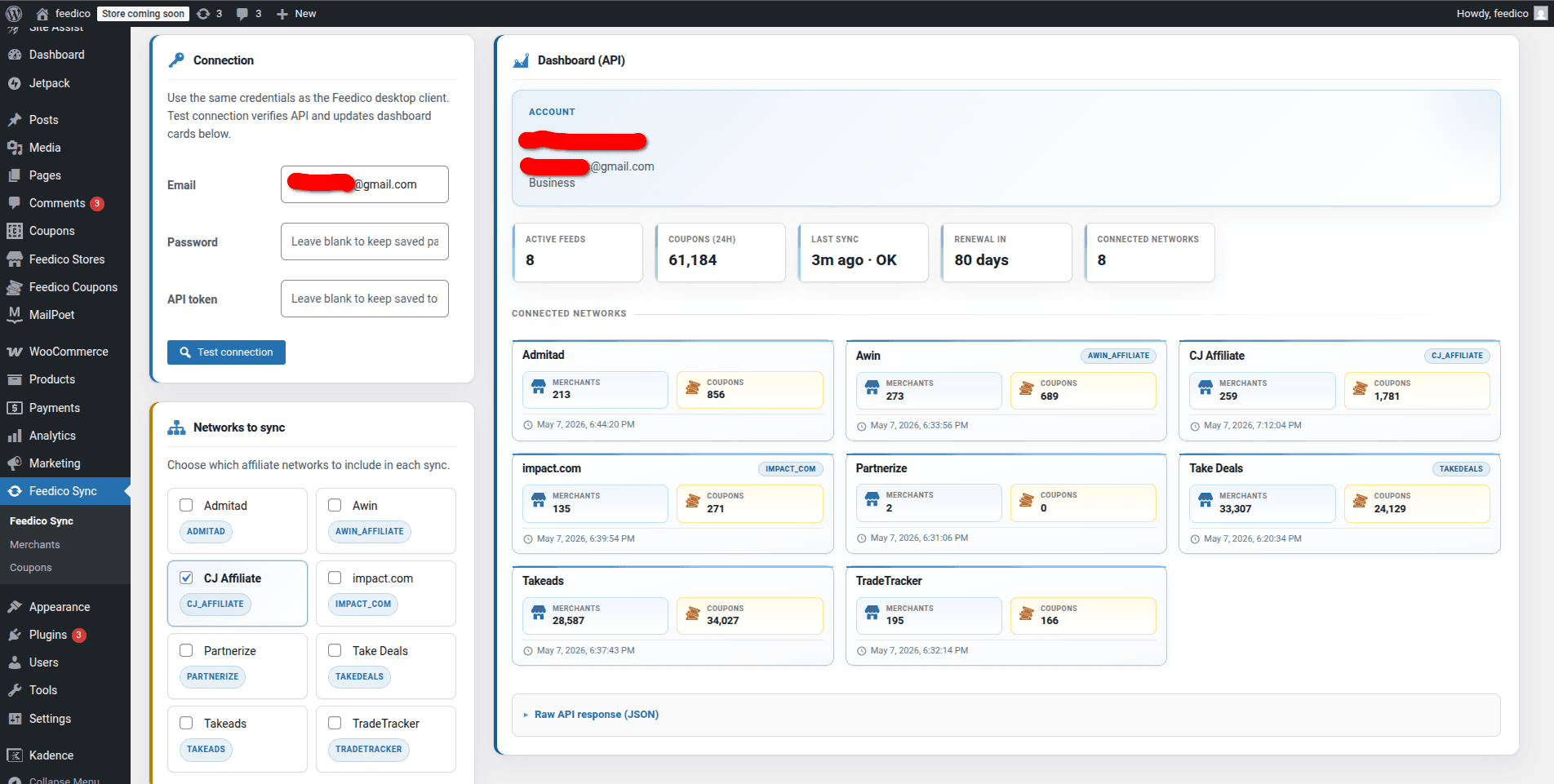
Feedico Sync dashboard
Connect email, password, and API token; choose which networks (Admitad, Awin, CJ Affiliate, impact.com, Partnerize, Takeads, and more) sync into WordPress; monitor active feeds, 24h coupon counts, last sync, and per-network merchant and coupon totals.
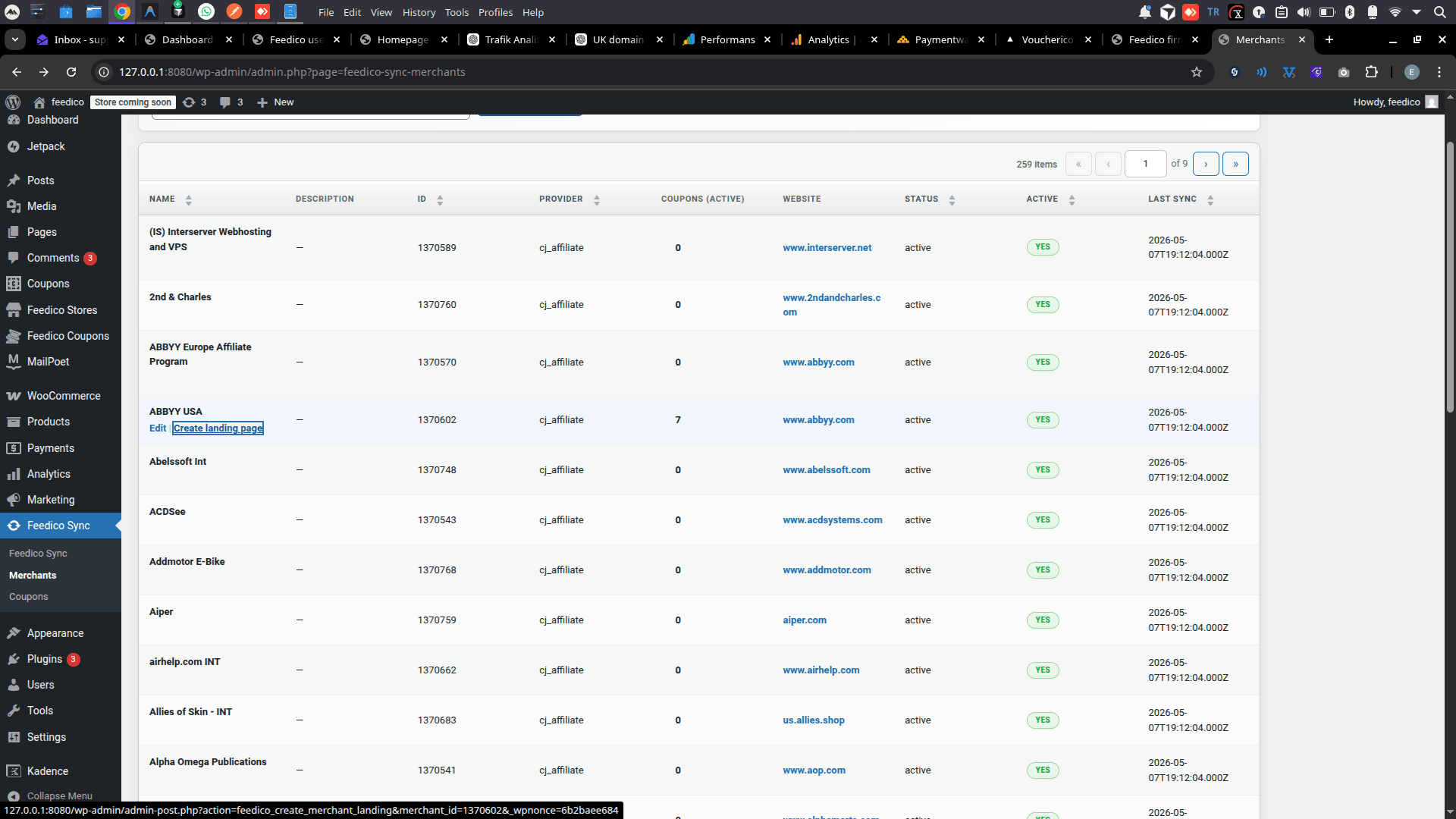
Merchants admin list
Search and paginate imported firms: provider keys (e.g. cj_affiliate), active coupon counts, website links, and last sync timestamps - use row actions to edit or spin up SEO merchant landers.
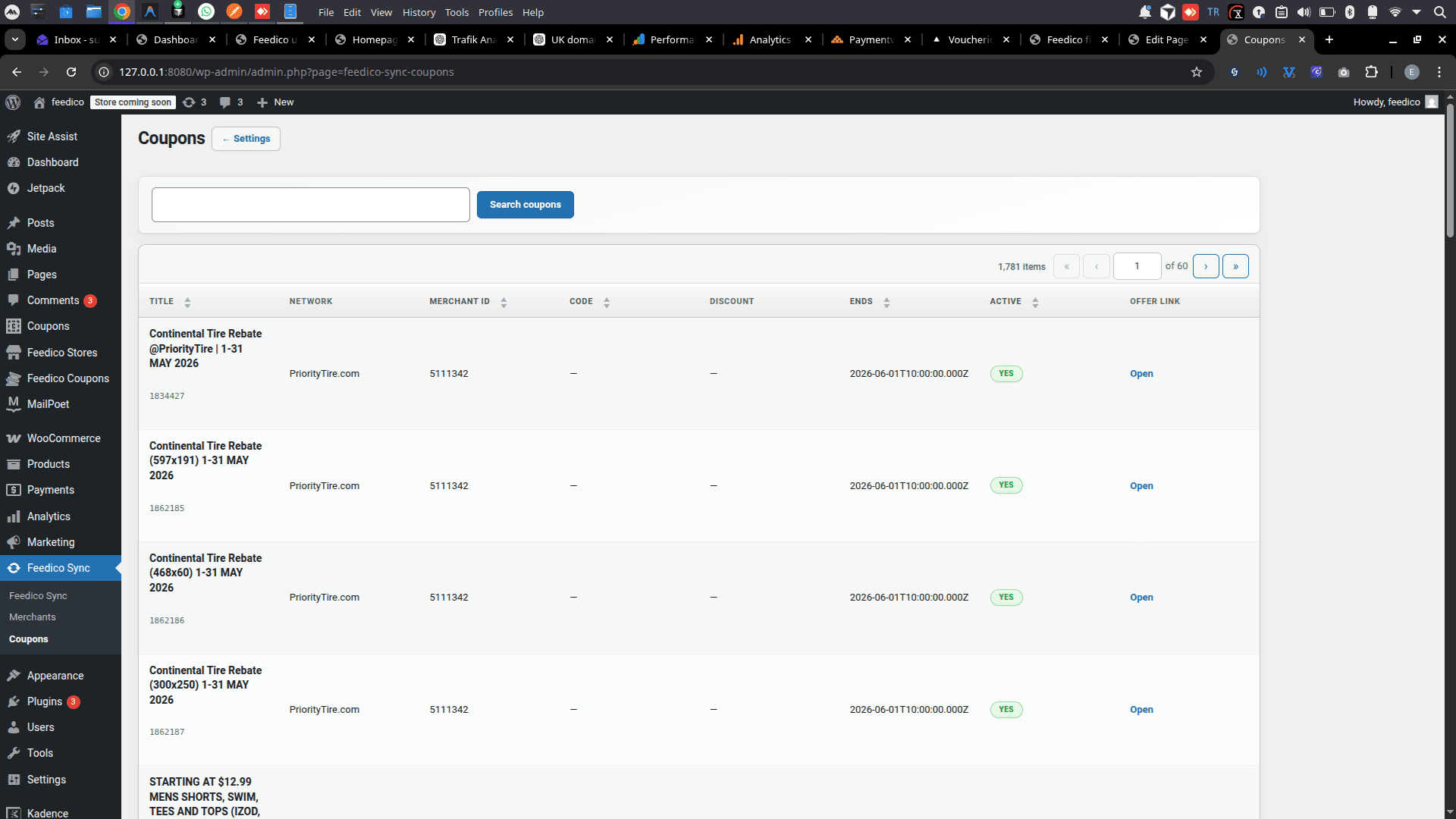
Coupons admin list
Normalized coupon rows at WordPress scale - title, network, merchant id, expiry, active flags, and offer links in one searchable grid for editorial and QA.
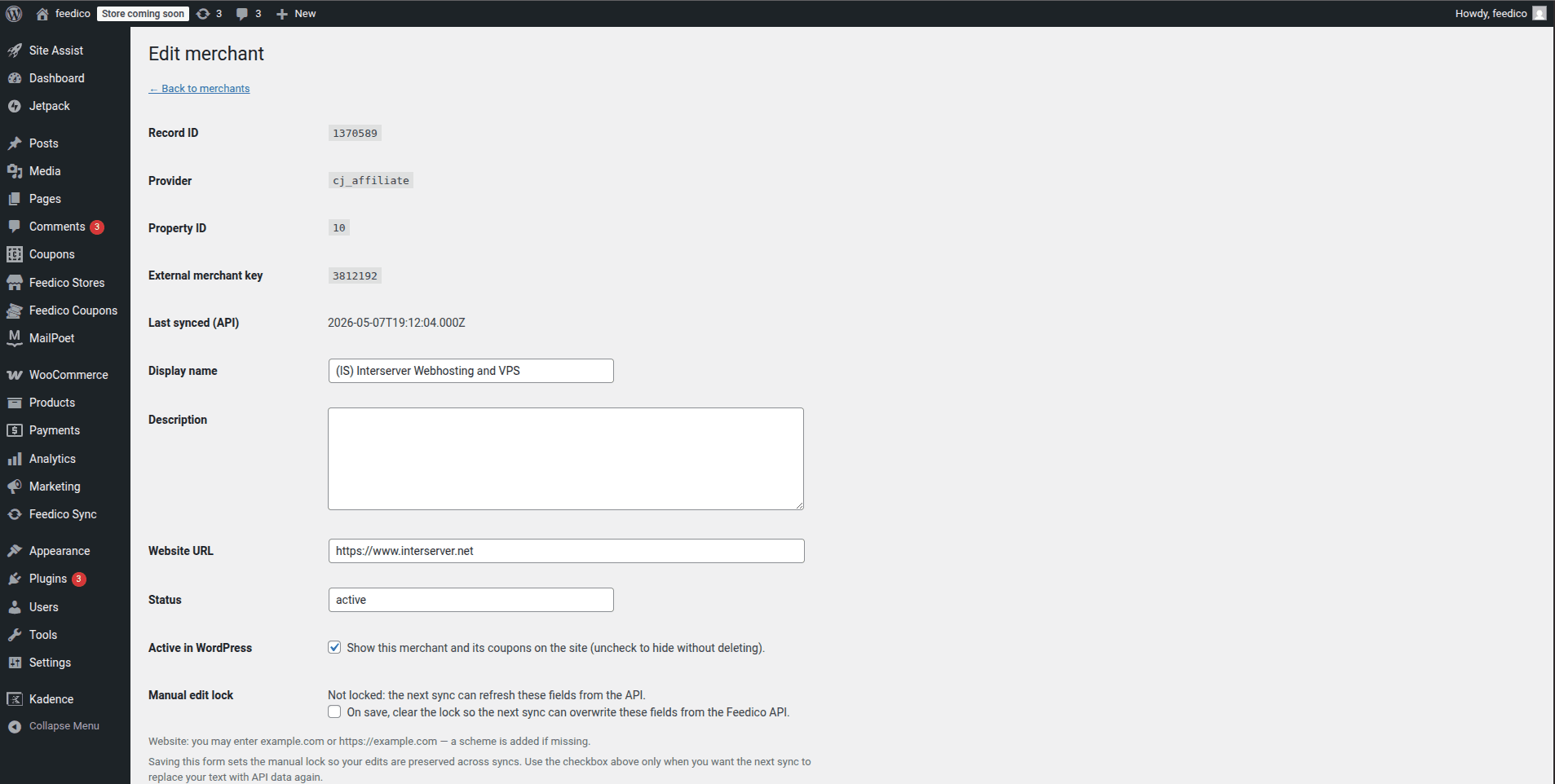
Edit merchant (SEO + control)
Tune display names and long descriptions for indexable store pages; toggle visibility in WordPress; optional manual lock so the next sync does not overwrite your custom SEO copy.
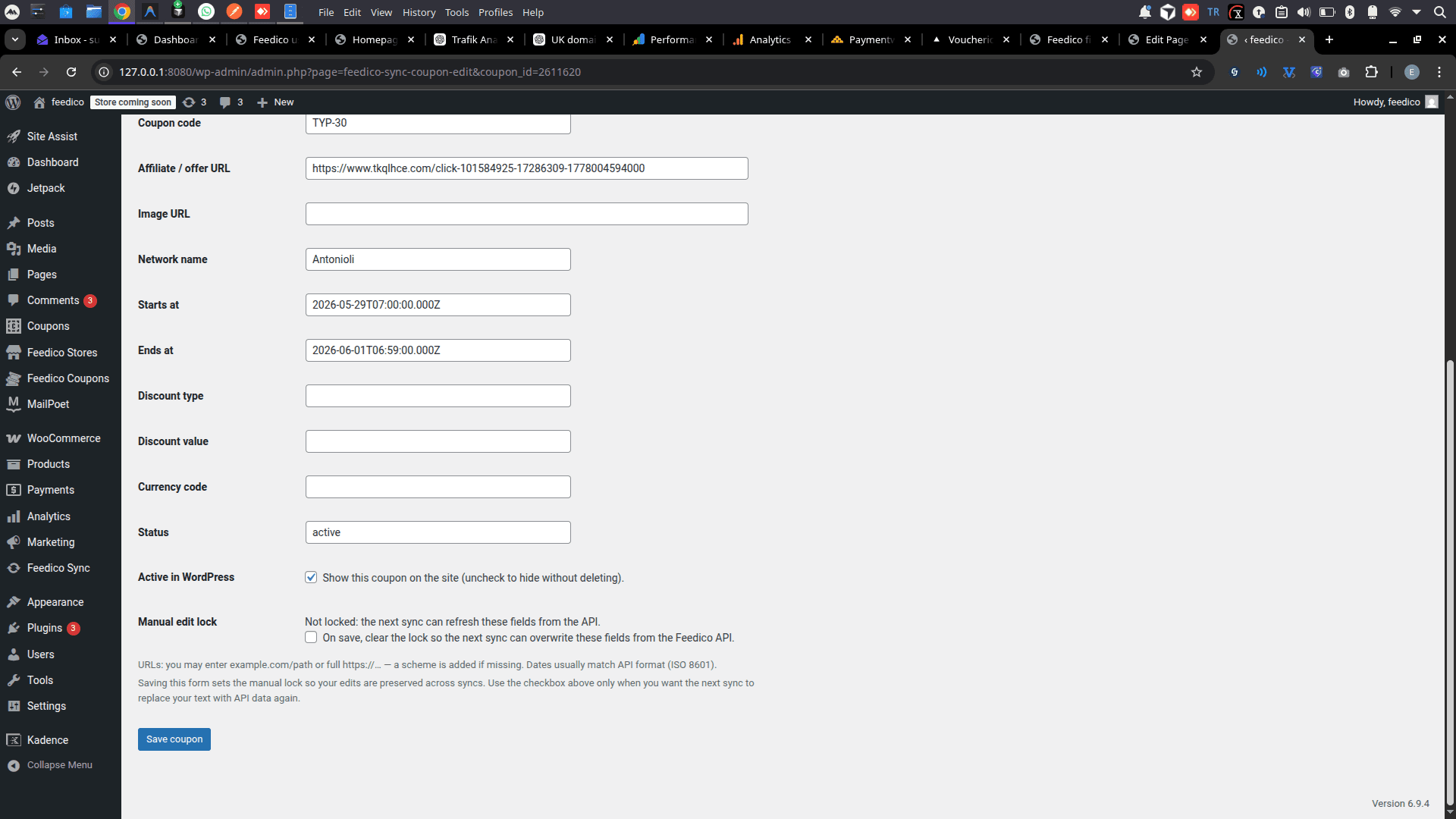
Edit coupon detail
Inspect voucher code, tracking URL, validity window, and status; hide single offers without deleting them; manual lock preserves editorial fixes across automated imports.
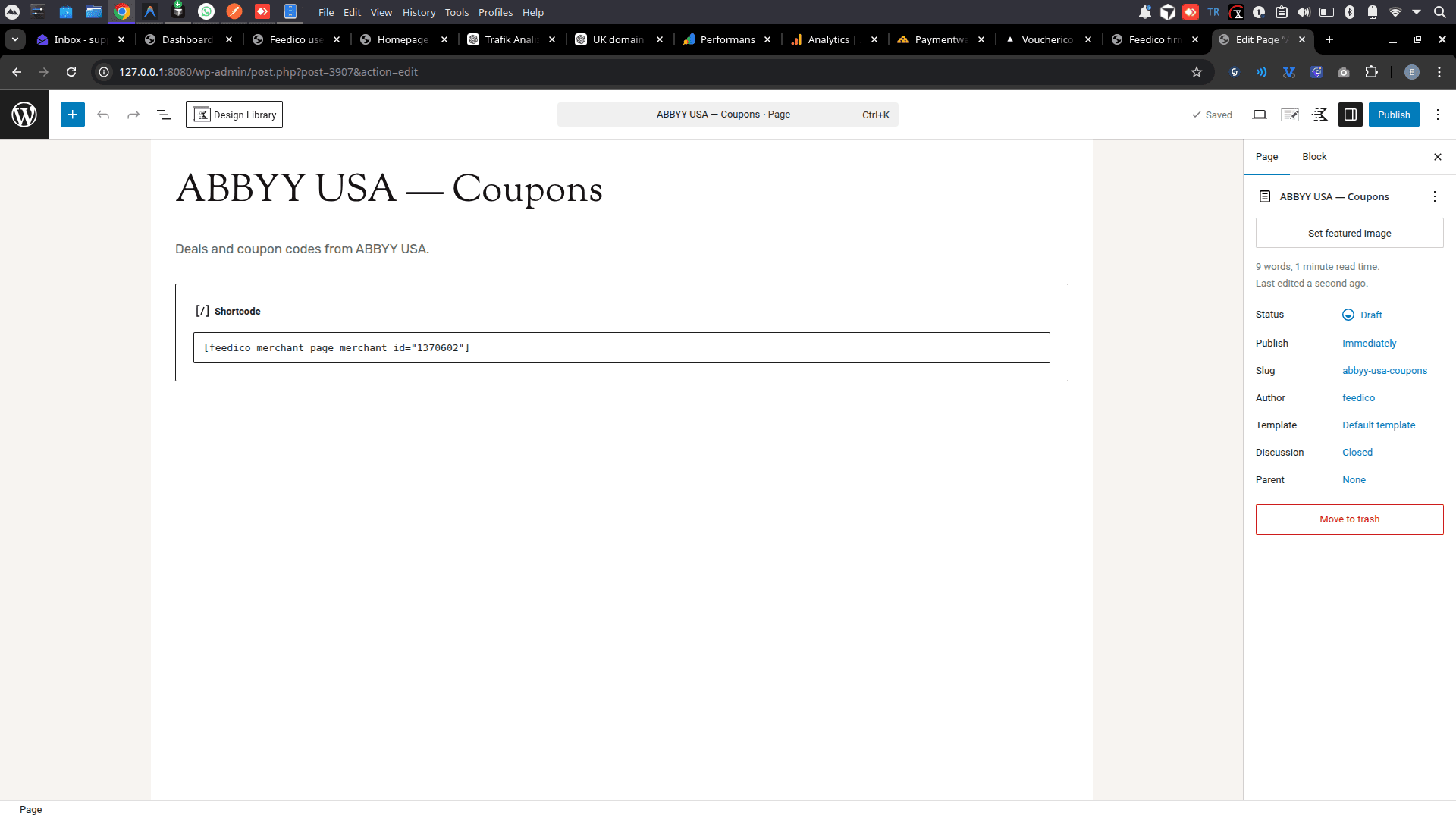
Page editor - shortcode
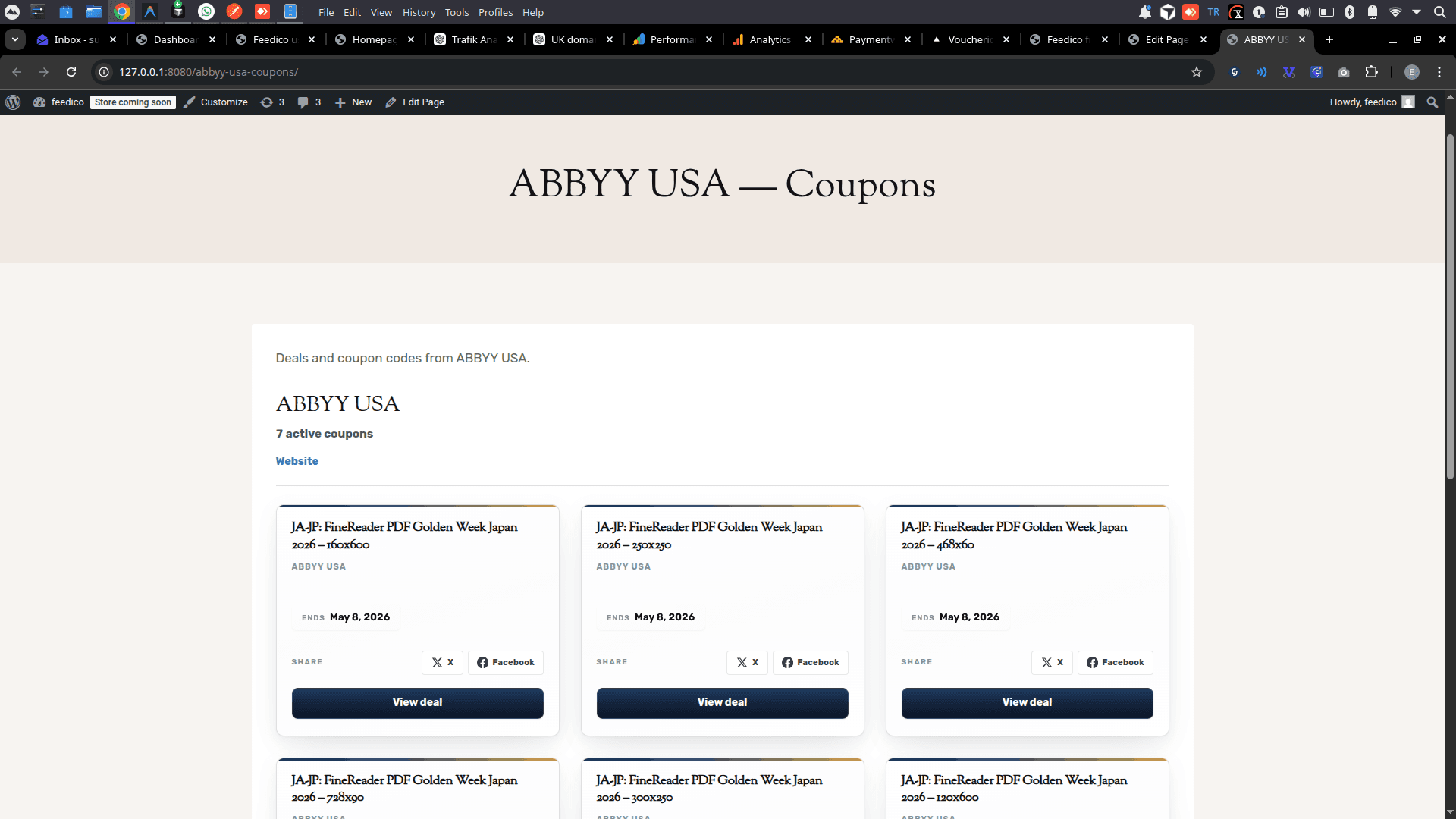
Drop `[feedico_merchant_page]` (or native blocks) onto any page - clean permalinks like /abbyy-usa-coupons/ for merchant-focused organic landing pages.
Public merchant coupon grid
Visitors see responsive coupon cards with titles, merchants, expiry, social share, and deep CTAs - exactly the indexable content coupon publishers need for SEO-heavy verticals.
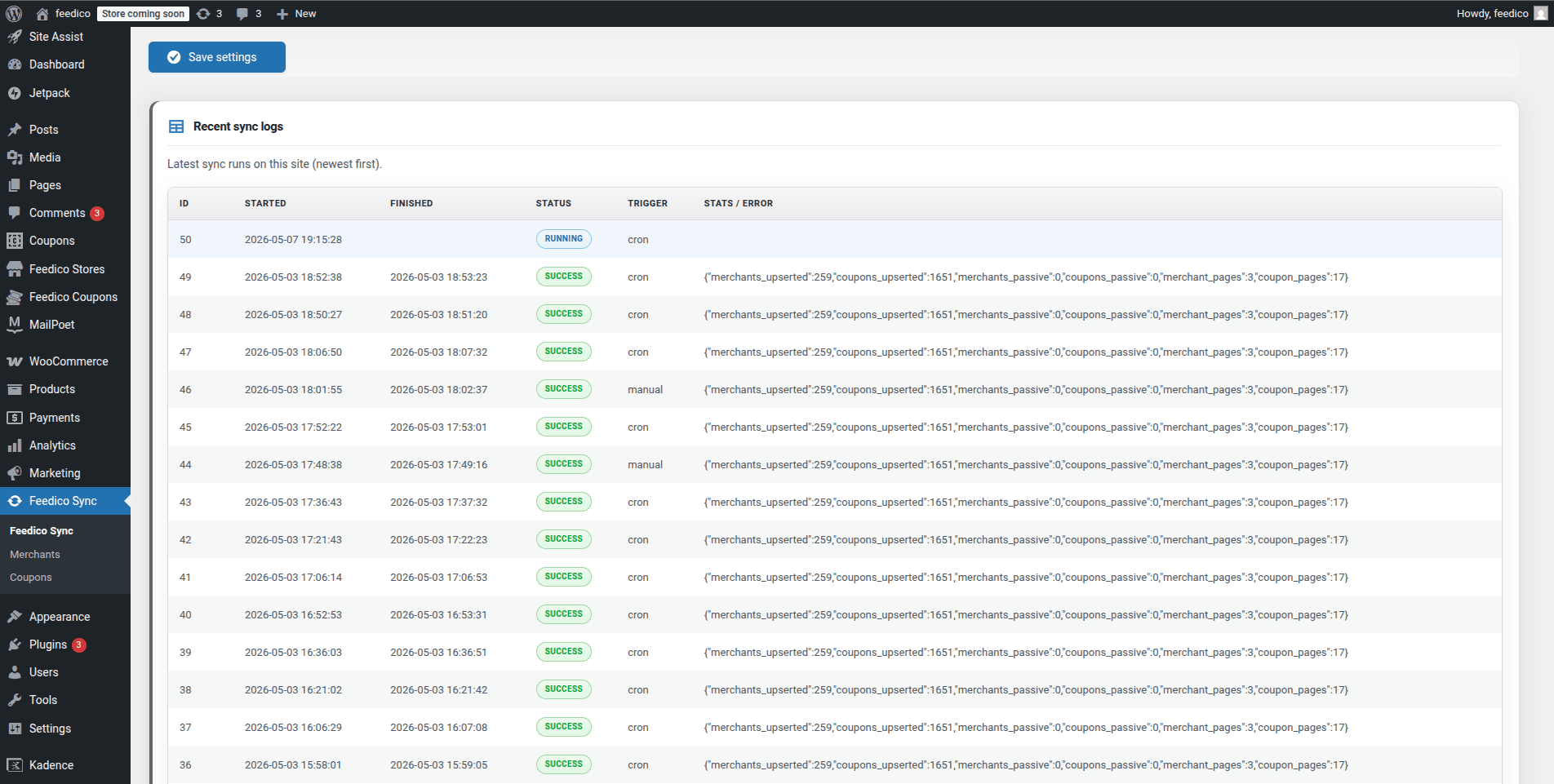
Recent sync logs
Every run shows SUCCESS or RUNNING, trigger (cron vs manual), duration context, and JSON stats - merchants upserted, coupons upserted, pages touched - so operators trust automation.
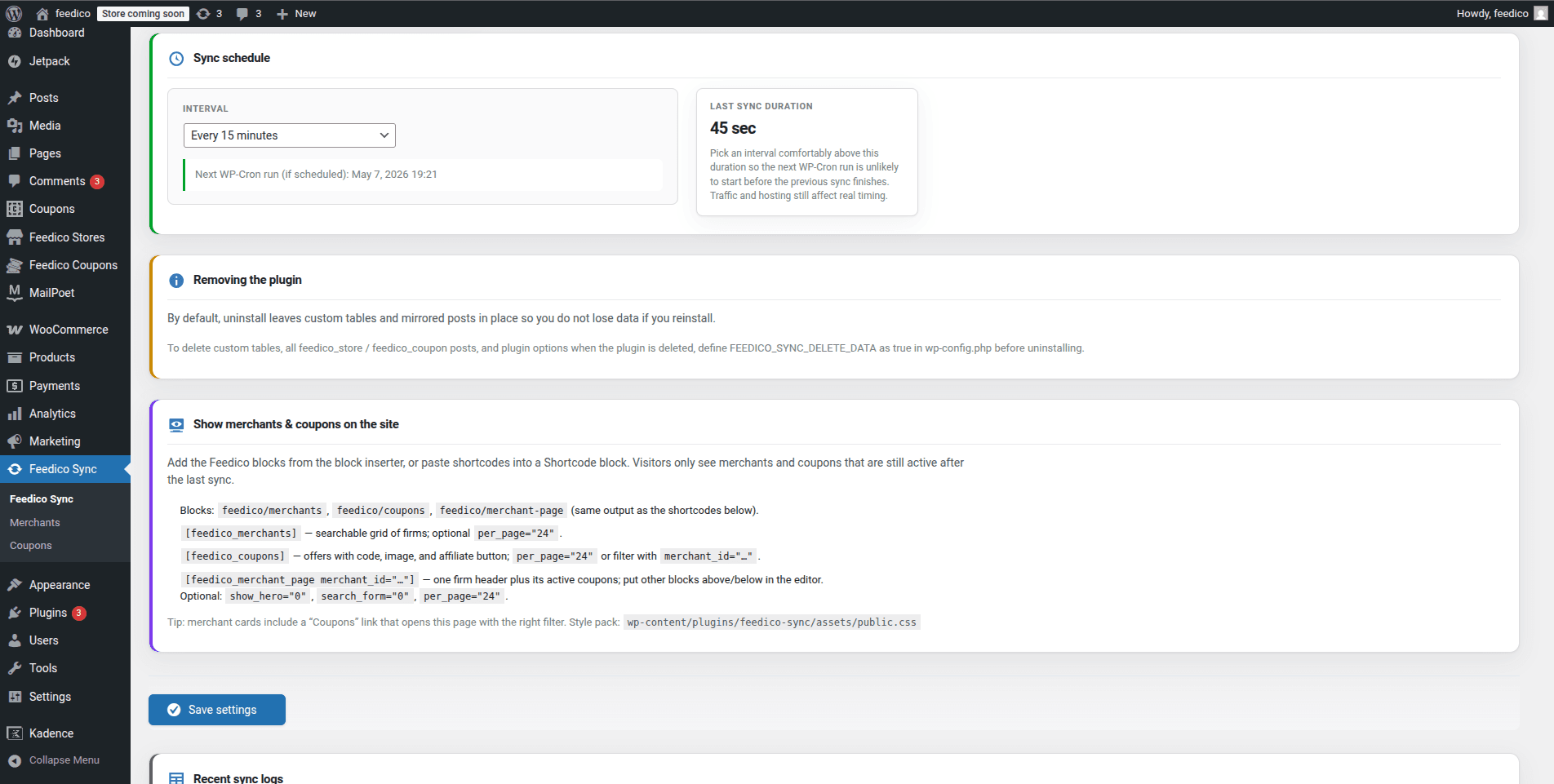
Schedule, blocks & uninstall hygiene
Tune WP-Cron interval vs last sync duration, copy-paste block names (`feedico/merchants`, `feedico/coupons`, `feedico/merchant-page`) and shortcodes, and document clean uninstall via wp-config when you need a full data wipe.
How the WordPress plugin works end-to-end
From affiliate network authorization in Feedico to public coupon grids - six high-signal beats.
- 1
Install Feedico Sync
Upload or install the plugin into wp-content/plugins, then activate it from the WordPress admin plugins screen.
- 2
Connect your Feedico token
Paste the Feedico connection details from your dashboard into the plugin settings so imports authenticate securely.
- 3
Choose networks and merchants
Select the affiliate programs and stores you want to surface - CJ, Awin, Impact-class networks, and others linked to your account.
- 4
Run the first import
Trigger an initial sync so merchants and coupons become WordPress posts or structured entries the plugin manages.
- 5
Publish layouts with blocks or shortcodes
Drop Gutenberg blocks or shortcodes onto pages to show coupon grids, merchant listings, and store templates visitors can click.
- 6
Enable scheduled updates
Turn on recurring sync so expired deals fall away, new voucher codes appear, and merchants stay aligned without spreadsheets.
Who should install this WordPress coupon plugin?
- ✔High-traffic coupon & deal websites
- ✔Affiliate bloggers adding store templates
- ✔Niche publishers stacking merchant landers
- ✔Deal communities syndicating offers
- ✔Cashback & rewards startups prototyping fast
- ✔Teams planning browser extensions fed by WP content
- ✔SEO-led affiliate sites needing page velocity
- ✔Agencies cloning repeatable voucher funnels
Plugin install, requirements, and developer notes
Feedico Sync is the official WordPress affiliate coupon plugin (GPLv2 or later, stable 2.0.6). It mirrors Feedico data through scheduled sync jobs, admin list tables, and front-end blocks (feedico/merchants, feedico/coupons, feedico/merchant-page) or shortcodes ([feedico_merchants], etc.).
- WordPress: 6.0+ (tested through 6.7)
- PHP: 7.4+
- Cron: ensure reliable
wp-cronor system cron for scheduled imports - Install path:
wp-content/plugins/, activate, open Feedico Sync in wp-admin
Privacy & uninstall: WordPress Tools → Export / Erase personal data covers saved emails and credentials. For a destructive uninstall, set FEEDICO_SYNC_DELETE_DATA in wp-config.php before delete (see the plugin readme).
Topics that pair with this plugin
Editorial clusters that cite a WordPress coupon plugin landing page.
- How to build a coupon website with WordPress
- Best WordPress coupon plugins for affiliate teams
- How to automate affiliate coupons without scrapers
- Creating SEO-friendly affiliate store pages
- Automatic coupon imports for WordPress publishers
- How to launch a voucher site with scheduled sync
- Affiliate coupon SEO checklist
- Choosing themes for high-volume deal sites
Continue exploring Feedico
Frequently asked questions
What is Feedico Sync?ShowHide
Feedico Sync is the official Feedico WordPress plugin (GPLv2 or later). It is an affiliate coupon plugin that connects your site to the Feedico cloud, imports merchants and coupons, and renders them with Gutenberg blocks or shortcodes - no custom REST client required from you.
Does the plugin generate SEO pages automatically?ShowHide
Yes. The plugin is built to turn imported merchants and coupons into indexable WordPress content: dedicated store pages, coupon grids, brand-style layouts, and search-friendly permalinks that stay fresh as scheduled sync runs.
Which affiliate networks does the plugin support?ShowHide
Coverage follows whatever you enable in your Feedico account - commonly CJ Affiliate, Awin, Impact, Partnerize, TradeTracker, Admitad, Takeads, Takedeals, and additional integrations as Feedico adds them. The plugin consumes Feedico's normalized data, not a single-network XML dump.
Do I need WordPress cron for automatic imports?ShowHide
WordPress scheduled actions rely on site traffic or a real server cron hitting wp-cron.php. For reliable affiliate coupon imports, use a proper cron job or managed host that guarantees wp-cron triggers - especially for high-volume coupon sites.
What are the hosting requirements?ShowHide
WordPress 6.0+ (tested through 6.7), PHP 7.4+, outbound HTTPS to Feedico, and writable storage for synced content. See the visible technical section below for block names, shortcodes, and install flow.
Is there a GitHub repository?ShowHide
Yes. Source and readme are public for review and community contribution; production installs should still follow release hygiene and Feedico connection guidance from your dashboard.